
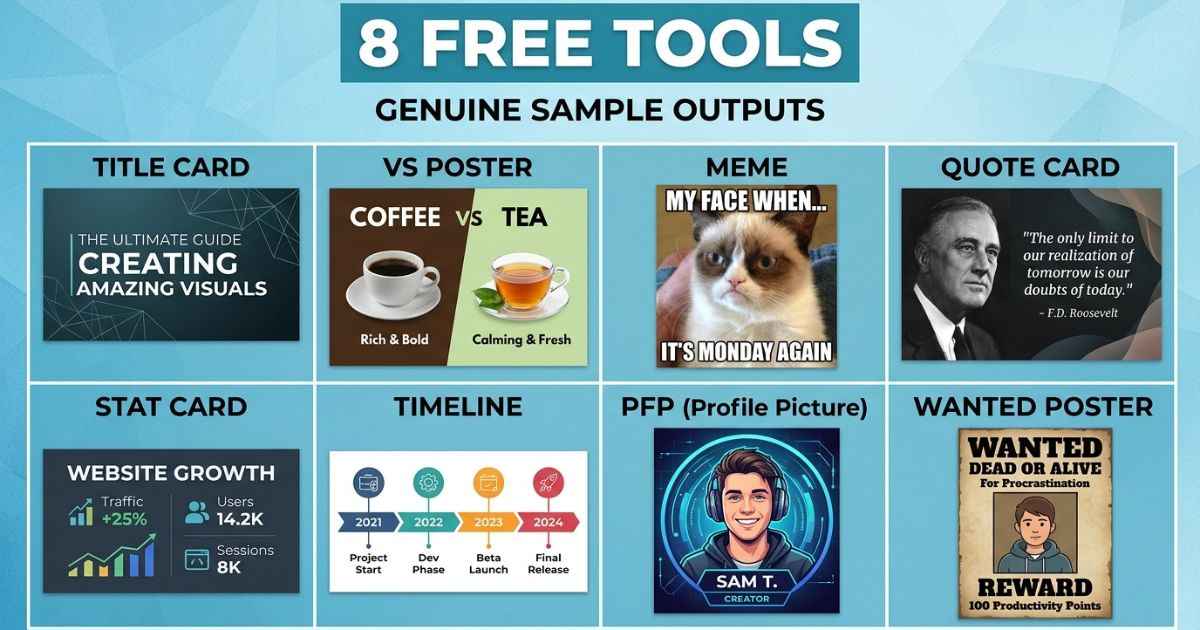
A collection of free tools for Invincible fan content is available online, covering everything from title cards to matchup posters and profile pictures. Every tool works right in your browser, needs no sign-up, and adds no watermark to your download. Here are 8 useful ones to try first.
Why Browser-Based Tools Work Well for Fan Content
Fan content is often created around a recent episode, scene, or idea, so a simple workflow can be useful. You watch an episode, you have an idea, and you want to make something while it’s still fresh. Downloading and learning heavy design software can add extra steps.
Browser-based tools remove some of that extra work. You open a page, upload a photo or pick a template, and create and download your finished graphic without going through a full design workflow. Nothing to install, nothing to configure, and no account needed just to save your work.
This can be useful on mobile, where many users browse and share fan content. A tool that works cleanly on a phone screen, with no app store detour, can fit the way fan content is created and shared.
8 Free Tools for Invincible Fan Content
Each of these tools focuses on one specific type of graphic, so you’re not stuck using a large all-in-one editor to get a simple result.
1. Title Card Generator
The Title Card Generator is built for the classic Invincible-style title card look: bold comic-book lettering, a scene or gradient background, and optional texture and glow effects. It’s the natural starting point if you’re making a thumbnail for a review, recap, or general episode video.
2. VS Battle Poster Maker
The VS Battle Poster Maker builds a split-screen matchup graphic, with two character photos facing off and a divider down the middle. It’s designed specifically for “who would win” content, tier-list debates, and fight-focused thumbnails.
3. Comic Meme Generator
The Comic Meme Generator uses the familiar top-text, bottom-text meme layout, but styled to match comic panel aesthetics. It’s a simple way to turn a reaction, a joke, or a fan theory into a shareable graphic.
4. Character Quote Card Maker
The Character Quote Card Maker pairs a character photo with a large, readable quote. It can work well for social posts, since a strong quote paired with a clean portrait can make the post more visually engaging than plain text alone.
5. Power/Stat Card Maker
The Power/Stat Card Maker turns a character into a trading-card-style graphic, complete with stat bars or ranking numbers. It’s useful if you want to rank characters by strength, speed, or any other power comparison.
6. Episode Timeline Maker
The Episode Timeline Maker lays out a visual season or story timeline, useful for recap videos or posts that walk through a sequence of events. It turns a wall of text into a visual layout that can be easier to scan.
7. Profile Picture (PFP) Maker
The Profile Picture (PFP) Maker crops any character image into a clean circular profile photo, ready for Discord, Twitter, or any platform that needs a square or round avatar. It’s a simple option if you just need to crop a character image into a profile picture.
8. Wanted/Recruitment Poster Maker
The Wanted/Recruitment Poster Maker gives a character an aged-paper, wanted-poster look, complete with a document-style border and bold header text. It’s a fun format for character intros, villain reveals, or roleplay-style fan posts.
Which Tool Should You Start With?
If you’re making a YouTube thumbnail for a normal video, start with the Title Card Generator since it’s built specifically for that job. If your video is a comparison or debate, the VS Battle Poster Maker can be a better fit for the content than a single-character title card.
For quick social posts, the Comic Meme Generator and Character Quote Card Maker are simple options for creating social graphics. If you just need a new profile picture, skip straight to the PFP Maker rather than trying to crop an image manually.
FAQs
Do I need to sign up to use these tools?
No. All 8 tools work directly in the browser with no account, login, or email required.
Will my download have a watermark?
No. Every export from these tools is a clean file with no watermark added.
Can I use these tools on my phone?
Yes. Each tool is built to work on mobile browsers as well as desktop, so you don’t need a computer to make fan content.
Are these tools free for commercial use, like a monetized YouTube channel?
Check the site’s terms before using generated graphics in monetized or commercial content. You should also make sure you have the rights to any images or characters you upload or use.
Which tool is best for a YouTube thumbnail specifically?
The Title Card Generator is built specifically for thumbnail-style graphics, while the VS Battle Poster Maker is a better pick if your video is a head-to-head comparison.
Next Step
Pick the tool that matches your idea, create your graphic, and check out the full Invincible generators collection when you want to see the other tools available.