
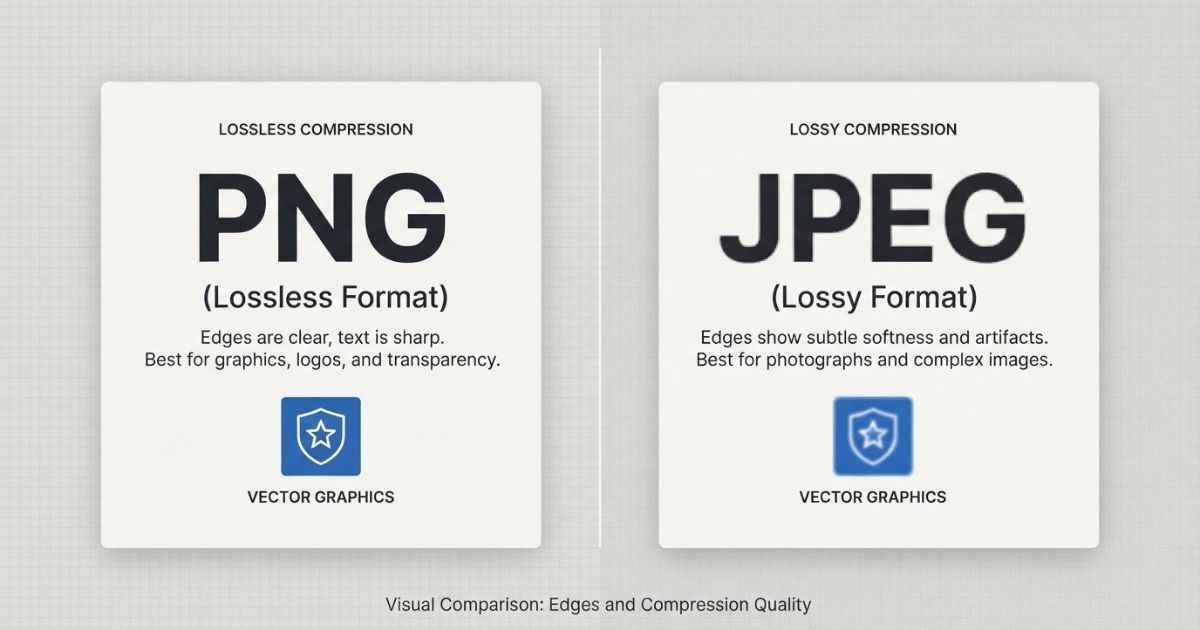
For text-heavy or comic-style thumbnails, PNG can be a good choice because lossless compression preserves sharp edges. JPEG can be useful when the thumbnail is mostly photographic and you want a smaller file. If you are not sure which one to pick, PNG is a useful starting point for comic-style, text-heavy, or high-contrast thumbnails.
What’s Actually Different Between PNG and JPEG
PNG and JPEG store image data in two different ways, and that difference can affect how the final image looks.
PNG uses lossless compression, so saving the image does not discard image data during compression. This makes PNG well suited to hard edges, flat colors, and crisp text.
JPEG uses lossy compression, which removes some image information to reduce file size. With a busy photo, the changes may be less noticeable, but sharp lines and small text can show fuzzy edges or other compression artifacts at stronger settings.
Neither format is “bad.” They are simply suited to different types of images. PNG is often useful for graphics and text, while JPEG is especially well suited to photographic images and images with many gradual color changes. A YouTube thumbnail can contain either type of content, so the better choice depends on the design.
Which Format Looks Sharper for Text and Bold Outlines
Short answer: PNG can preserve text and bold outlines more cleanly than JPEG when compression artifacts would otherwise become visible.
YouTube thumbnails often use big, bold text and thick outlines to make the main subject clear. This is especially common in comic-style or superhero content, where a title card may include thick lettering, glow effects, or a hard-edged border around a character.
JPEG compression can create small artifacts around sharp edges, especially at stronger compression levels. On a title card, this can appear as slight smudging around letters or a less clean edge where two colors meet. Those artifacts can become more noticeable when the thumbnail is displayed at a smaller size.
PNG preserves the original image data during compression, which can help keep letters, outlines, and other sharp details clean before the image is resized or processed elsewhere.
This makes PNG a useful option for comic and superhero thumbnails with heavy text or line work, and it’s also why the title card generator lets you export as either PNG or JPEG instead of locking you into one. You can test both formats and see which one works better for your specific design.
Which Format Gives a Smaller File Size
JPEG’s main advantage over PNG is file size. JPEG can produce a much smaller file than PNG for many photographic images, depending on the image and compression settings.
This matters more in some situations than others. If you’re uploading a thumbnail directly to YouTube through the Creator Studio, the file-size limit depends on the device you are using. YouTube currently lists different limits for mobile and desktop uploads.
Smaller file size can also be useful when you’re storing many thumbnail drafts, sharing files over a slow connection, or placing images somewhere with a strict file-size limit. For a single upload, though, the format choice is usually more about image content and quality than saving a small amount of storage space.
Does YouTube Compress My Thumbnail Anyway?
YouTube processes uploaded thumbnails for display across different devices and placements.
This means the image you upload may not look exactly the same after it is processed for display. You might export a high-quality PNG, upload it, and still notice some difference in the final version. That’s normal when images are prepared for different screens and placements.
Because of this, some creators wonder if the extra sharpness of PNG even matters. Starting with a clean, high-quality source can help preserve important details when the image is later processed or resized. If a JPEG has already lost detail through strong compression, those artifacts are part of the source image and may remain visible after further processing or resizing.
In short: you cannot control every step of YouTube’s image processing, but using a clean, high-quality source gives you a better starting point before the thumbnail is processed.
Quick Decision Table: PNG or JPEG for Your Thumbnail
| Situation | Best Format |
|---|---|
| Bold text, thick outlines, comic-style graphics | PNG |
| Mostly a photo with little or no text | JPEG |
| Glow effects, gradients, or fine detail on edges | PNG |
| You need the smallest possible file size | JPEG |
| You’re not sure | PNG as a useful starting point |
| Uploading straight to YouTube’s thumbnail slot | Either can work |
If your thumbnail is a mix of a photo background with bold text on top, PNG can still be a useful choice because it preserves the sharp edges of the text while keeping the file format suitable for graphics.
FAQs
Does PNG or JPEG affect my YouTube click-through rate?
Not directly. A thumbnail with sharp, readable text can be easier to understand at a glance, while PNG can help preserve those sharp edges better than JPEG in some designs.
Can I upload a PNG thumbnail directly to YouTube?
Yes. YouTube currently recommends JPG, GIF, or PNG for custom thumbnails. The size limit depends on the upload device: 2 MB for video thumbnails on mobile and 50 MB on desktop.
Is PNG always better than JPEG for thumbnails?
Not always. PNG can be useful for text, outlines, and sharp graphics, while a photographic thumbnail can often work well as JPEG at a smaller file size.
Why does my JPEG thumbnail look blurry around the text?
This can happen because JPEG compression removes some image detail to reduce file size, and that loss can be more noticeable around hard edges such as letters and outlines.
Does file size actually matter for a YouTube thumbnail?
It can matter when you need to meet an upload limit or store and share many files. As long as your file stays within YouTube’s current upload limit, file size usually isn’t the main design decision.
What’s the best export size for a YouTube thumbnail?
YouTube currently recommends a thumbnail resolution of 3840×2160 pixels, with a minimum width of 640 pixels. A 16:9 aspect ratio is recommended for most players and previews.