
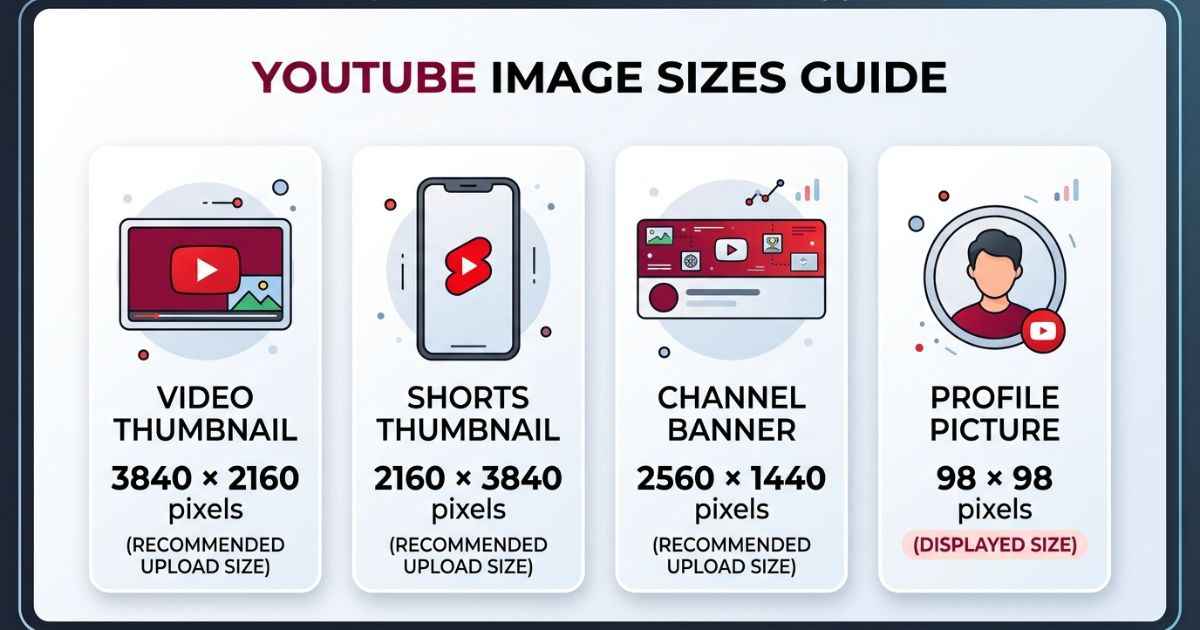
This YouTube thumbnail size guide covers the main YouTube image sizes you need in 2026. A standard video thumbnail is 3840×2160 pixels. A Shorts thumbnail is 2160×3840 pixels. A channel banner is 2560×1440 pixels. A channel profile picture is a square image that displays at 98×98 pixels. Each one has different rules, and we explain them below.
Standard Video Thumbnail (Quick Reference)
The recommended YouTube thumbnail size is 3840×2160 pixels. This uses a 16:9 ratio, which means the image is wider than it is tall. YouTube recommends this size for custom video thumbnails. The minimum thumbnail width is 640 pixels.
You do not have to use exactly 3840×2160 pixels. But using a large image gives you more detail and makes it easier to create a sharp thumbnail. If you are making a thumbnail from scratch, our step-by-step thumbnail design guide can help you plan the size, text, and layout.
YouTube recommends a 16:9 ratio for regular video thumbnails. This helps your thumbnail fit the normal video layout across YouTube.
Shorts Thumbnail and Vertical Canvas (Quick Reference)
For a custom YouTube Shorts thumbnail, YouTube recommends a 9:16 ratio and a size of 2160×3840 pixels. The minimum height is 640 pixels.
Shorts thumbnails work a little differently from regular video thumbnails. YouTube lets you select a frame from your Short, and custom thumbnail options are also available for Shorts.
If you are making the actual vertical Short instead of the thumbnail, 1080×1920 pixels is a common 9:16 video size. This is a video canvas size, not YouTube’s current recommended custom Shorts thumbnail size.
For more help with vertical designs, our Shorts cover size guide explains the 9:16 layout and where to keep important text and images.
Because Shorts are shown vertically, some YouTube buttons and other screen elements can appear around the video. Keep important text, faces, and logos away from the edges so they are easier to see.
Channel Banner Size
Short answer: use 2560×1440 pixels for your YouTube channel banner.
YouTube uses the same banner image on computers, phones, tablets, and TVs. However, each device can show a different part of the image. This means some parts of your banner may be cropped.
The minimum banner size is 2048×1152 pixels. YouTube also gives a 1235×338 pixel safe area for text and logos at this minimum size. The recommended banner size is 2560×1440 pixels.
The 1235×338 figure is tied to the minimum 2048×1152 banner size. It should not be treated as the exact safe-area size for every 2560×1440 banner.
The easiest approach is to keep your important text and logos near the center of the banner. You can also use YouTube’s banner preview to check how your design looks on different devices.
If you are designing a banner for the first time, our YouTube channel banner size and safe-area guide can show you where to place your important content.
Channel Icon / Profile Picture Size
Short answer: use a clear square image for your YouTube channel icon.
YouTube’s current branding information says the profile picture displays at 98×98 pixels. The maximum file size is 15 MB.
YouTube accepts JPG, GIF, BMP, and PNG files for profile pictures. Animated GIFs are not supported.
YouTube does not list 800×800 pixels as an official recommended upload size. So it is better not to call 800×800 the official YouTube size.
A square image is still a good choice. Keep your face, logo, or main subject near the center. Do not put important details too close to the corners.
The 98×98 pixel size is the displayed size, not a stated minimum upload size. YouTube does not say that 98×98 is the smallest image you can upload.
Video End Screen Elements
End screens are clickable elements that appear near the end of a YouTube video. They can include a subscribe option, another video, a playlist, or other YouTube content.
An end screen is not a single image, so it does not have one fixed image size like a thumbnail or banner.
When editing the end of your video, leave some clear space for these elements. Keep important text, faces, and other details away from places where clickable elements may appear.
Planning this space before you finish the video makes the end screen easier to use. It also helps prevent important parts of your video from being covered.
If you want to learn more, our YouTube end screen guide explains how these elements work and where to leave space for them.
File Size and Format Limits Across All of These
YouTube does not use the same file-size rules for every image.
For video thumbnails, YouTube recommends JPG or PNG. The size limit depends on how you upload the thumbnail. Mobile uploads can be up to 2 MB, while desktop uploads can be up to 50 MB.
For channel banners, the maximum file size is 6 MB. The recommended banner size is 2560×1440 pixels, and the minimum size is 2048×1152 pixels.
For channel profile pictures, YouTube accepts JPG, GIF, BMP, and PNG files. The maximum file size is 15 MB.
It is still a good idea to keep your images as small as possible without making them look blurry. Smaller files are easier to upload and manage.
For a simple guide to image compression, our image file size and compression guide explains how to make images smaller without losing too much quality.
Quick Reference Table (All Sizes At Once)
| Element | Recommended / Official Size | Ratio / Notes |
|---|---|---|
| Standard video thumbnail | 3840×2160 px | 16:9 |
| Minimum video thumbnail width | 640 px | 16:9 recommended |
| Shorts thumbnail | 2160×3840 px | 9:16 |
| Minimum Shorts thumbnail height | 640 px | 9:16 recommended |
| Vertical Shorts video canvas | 1080×1920 px | Common 9:16 video size |
| Channel banner | 2560×1440 px | 16:9 |
| Banner minimum upload | 2048×1152 px | 16:9 |
| Banner safe area | 1235×338 px | Applies at the minimum banner size |
| Channel profile picture | 98×98 px displayed | Use a clear square image |
FAQs
What is the correct YouTube thumbnail size for 2026?
YouTube currently recommends 3840×2160 pixels for custom video thumbnails. The recommended ratio is 16:9, and the minimum thumbnail width is 640 pixels.
Why does my channel banner look cropped on mobile?
YouTube shows your banner differently on different devices. Some parts may be cropped on phones, computers, or TVs. Keep important text and logos near the center of the banner.
What is the safe area for a YouTube channel banner?
YouTube lists a 1235×338 pixel safe area at the minimum 2048×1152 banner size. The recommended banner size is 2560×1440 pixels. The 1235×338 figure should not be treated as a fixed safe area for every banner size.
Can I use a rectangular image for my channel icon?
A square image is the best choice for a YouTube profile picture. The profile picture displays at 98×98 pixels, so keep your main face or logo near the center.
Does thumbnail file format affect video quality?
The file format does not decide the quality of your video. YouTube processes the thumbnail after you upload it. Starting with a sharp JPG or PNG gives YouTube a good image to work with.
What size should I use for a YouTube Shorts thumbnail?
For a custom Shorts thumbnail, YouTube recommends 2160×3840 pixels with a 9:16 ratio. If you are making the actual vertical Short, 1080×1920 pixels is a common video canvas size.
Is there a minimum resolution YouTube will accept for thumbnails?
For standard video thumbnails, YouTube lists a minimum width of 640 pixels. For Shorts thumbnails, the minimum height is 640 pixels.