
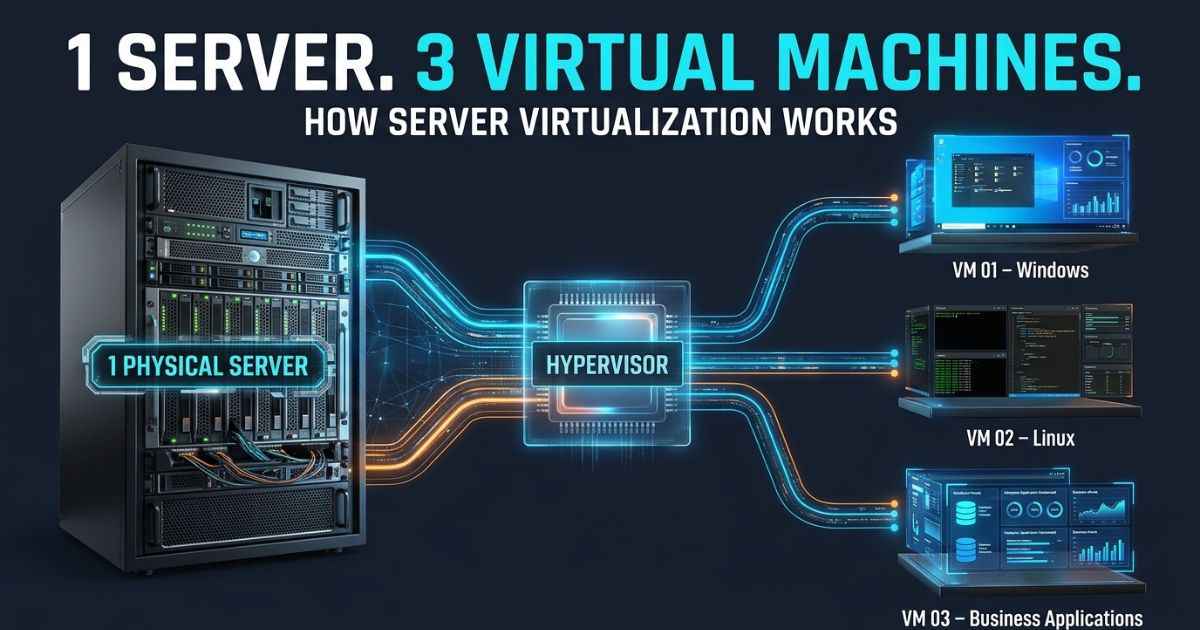
What is server virtualization? It lets one physical server act like several separate computers. Software splits the server’s power into virtual machines, and each one runs on its own. This guide explains how that works in plain words. You will also see the types, the real benefits, and the risks that most guides skip.
One catch matters most. Those separate computers still sit on one real machine. If that machine fails, several of them can feel it.
What Is Server Virtualization?
Server virtualization lets one physical server run several separate virtual machines. Each virtual machine, or VM, can have its own operating system and apps. They all share the server’s CPU, memory, and storage. Special software called a hypervisor divides those resources and keeps the VMs apart.
Think of an apartment building. The building is the physical server. Each apartment is a VM. The tenants share the pipes and power, but each one has a locked door.
Here are the key parts:
- Physical server (host): the real hardware, with its CPU, memory, storage, and network connection.
- Hypervisor: the software that manages the VMs and hands out the hardware resources.
- Virtual machine (VM): a virtual computer that runs on the host.
- Guest operating system: the operating system inside each VM, such as Linux or Windows Server.
The setup looks like this:
Physical server (CPU, RAM, storage, network)
        ↓
Hypervisor
        ↓
VM 1 (guest OS + apps)   VM 2 (guest OS + apps)   VM 3 (guest OS + apps)
The idea is simple. Server virtualization separates the server’s resources from the jobs that run on it.
How Does Server Virtualization Work?
A hypervisor sits between the hardware and the VMs. It gives each VM a share of the resources. Each VM acts as if it has its own computer. Let’s look at each layer.
The Physical Server: CPU, RAM, Storage, and Network
Every VM depends on the real machine underneath. That machine provides four main resources:
- The CPU, which is the processor that does the work.
- RAM, which is the memory programs use while they run.
- Storage, which holds VM files and data.
- A network connection, which links VMs to other systems.
All of these belong to the host. The VMs share them.
The Hypervisor: The Software That Manages Virtual Machines
The hypervisor decides which VM gets how much of each resource. It also keeps the VMs separate from each other. Without it, the VMs would not know how to share the hardware.
Some real products people discuss are Microsoft Hyper-V, VMware ESXi, Proxmox, and XCP-ng. KVM is another virtualization technology you may see named.
Here are two details about how real products are built. In Hyper-V, the hypervisor virtualizes processors and memory. A part called the root partition manages the physical devices and provides virtual device services. Proxmox VE uses KVM for full virtual machines and LXC for containers.
Virtual Machines and Guest Operating Systems
A VM works like a separate virtual computer. It can run its own guest operating system and its own apps. One host might run a Windows Server VM next to a Linux VM. Each VM runs in its own environment, but VMs can communicate through virtual networks. Their network settings control which connections are allowed.
How Resources Are Shared Between Virtual Machines
Sharing only works when someone plans it. Here is the basic flow:
- The hypervisor gives each VM a share of CPU, memory, storage, and network access.
- Each VM runs its own guest OS and apps inside that share.
- The hypervisor handles requests so the VMs do not collide.
- An admin can change the shares when a VM needs more or less.
Planning matters because resources are limited. One commenter in a forum thread reported problems with dynamic memory. They suspected a memory leak or slow memory allocation, but were unsure which caused the crash. That is one person’s report. It shows why resource settings need care.
What Are the Main Types of Server Virtualization?
Writers group virtualization in different ways. This section covers the main methods. The next section covers a separate question, which is where the hypervisor runs.
| Method | What it means | Guest operating system |
|---|---|---|
| Full virtualization | The VM gets a virtual hardware setup. | Can run without special changes for a hypervisor. |
| Paravirtualization | The guest is modified to work with the hypervisor. | Talks to the hypervisor directly. |
| OS-level virtualization | Most isolated spaces share the host’s operating system. | Standard containers have no separate guest OS in each space. |
Full Virtualization
In full virtualization, the hypervisor gives each VM a virtual version of the hardware. The guest operating system can run without being changed for that hypervisor. It acts as if it sits on a normal computer.
Paravirtualization
In paravirtualization, the guest operating system is modified to communicate with the hypervisor. This lets it use virtualization-aware interfaces instead of relying on full hardware simulation. The main difference from full virtualization is this change to the guest.
OS-Level Virtualization and Containers
OS-level virtualization works differently. Most standard containers share the host operating system’s kernel. The kernel is the core part of an operating system. A regular VM runs its own guest OS, but a standard container does not. Windows Server also supports Hyper-V-isolated containers, which run inside a highly optimized virtual machine.
We compare the two in more detail later.
Hardware-Assisted Virtualization
Some processors help with virtualization. Intel VT-x and AMD-V are two examples of this processor support. This is not a separate hypervisor type. It is a hardware feature that supports the methods above.
What Is the Difference Between Type 1 and Type 2 Hypervisors?
Type 1 and Type 2 describe where the hypervisor runs. They do not describe how the VM works. That is a different question from full or paravirtualization, so do not mix the two lists.
| Type 1 hypervisor | Type 2 hypervisor | |
|---|---|---|
| Where it runs | Directly on the physical hardware | On top of a host operating system |
| What sits below it | Nothing but the hardware | A host operating system |
Type 1 Hypervisors
A Type 1 hypervisor runs directly on the physical hardware. Microsoft’s documentation calls Hyper-V a type-1 hypervisor. It supports several VMs on one host.
Type 2 Hypervisors
A Type 2 hypervisor runs on top of an existing host operating system. The host OS sits between the hypervisor and the hardware. This is the main difference from Type 1.
Server Virtualization vs. Physical Servers
A virtual server is not magic. A real server still sits underneath it. The table shows the key differences.
| Area | Virtualized setup | Traditional physical server |
|---|---|---|
| Hardware | Shared by several VMs | Tied more directly to its own hardware |
| Workloads | Several separate workloads can share one machine | Resources belong to that one machine |
| Host problems | Several VMs can depend on the same host | The workload depends on its own machine |
Virtualization does not remove the physical server. It changes how the server’s power gets used.
What Are the Benefits of Server Virtualization?
Here are the main reasons groups use it, with the reason behind each one.
- Fewer physical servers. Several workloads can share one machine, so a group may need less hardware.
- Better use of hardware. Some servers sit mostly idle. Virtualization can help put that spare capacity to work.
- Easier separate environments. Each VM is its own space. Setting up and managing separate environments gets simpler.
- Backup and disaster recovery. VMs can be backed up and recovered as units.
- Easier moves. Some migration and management jobs get simpler. For example, Hyper-V can move a running VM between hosts with no perceived downtime in supported setups. That feature is called live migration.
Be careful with big percentage claims. You may see a number about how little of a server gets used. Server utilization means how much of a server’s capacity is in use. Research from Lawrence Berkeley National Laboratory uses different assumptions for different kinds of data centers. So no single percentage fits every server. Utilization differs across data-center types, workloads, and operating conditions.
What Are the Disadvantages and Risks of Server Virtualization?
The shared setup brings real trade-offs. Here are five.
| Risk | What it means | How to lower it |
|---|---|---|
| Host failure | Several VMs may go down if their shared host fails. | Plan clusters and keep backups. |
| Slow performance | VMs can compete for limited CPU, memory, storage, or network. | Set resource shares with care. |
| Licensing and support costs | Software terms can cut the savings. | Read the license terms before you buy. |
| VM sprawl | Too many VMs pile up and no one can manage them all. | Track and review your VMs. |
| Security duties | Isolation does not secure the host, hypervisor, or guests for you. | Secure each layer and the network. |
Real stories show these risks. Some forum users who moved from VMware to Hyper-V named problems. They listed remote console trouble, domain controller moves, live migration issues, and juggling several management tools. Other users in the same threads reported good moves and savings. So results are mixed.
Another user described serious trouble with a Hyper-V cluster after switch firmware upgrades. They had quorum and rebuilding problems. Other users praised Proxmox and Hyper-V. These are personal reports. They are not proof that any platform is always good or bad. The lesson is to plan for backups, hardware fit, and recovery.
Performance is a common worry. In a May 2021 Reddit discussion, one commenter estimated about 1 GB of RAM and under 5% CPU for a light Proxmox setup. They separately reported 2 to 4% idle CPU use on their own host with several lightly used VMs. These are personal observations and estimates, not benchmark results. Overhead depends on hardware, workload, settings, and hypervisor.
Security needs its own plan. NIST SP 800-125 covers security for full virtualization. It looks at the host, the hypervisor, the guest systems, and their settings. Isolation helps, but it does not replace security controls.
Cost needs a closer look too. Fewer servers can mean lower hardware needs. But software licenses, support, and admin time still cost money. Microsoft’s guidance says Windows Server VM rights depend on the licensing model, the edition, and the coverage.
What Are Common Server Virtualization Examples and Uses?
Here are common ways groups use it:
- Running separate apps or workloads on shared server hardware.
- Building development and testing environments.
- Supporting backup and disaster recovery.
- Hosting virtual desktops.
- Supporting cloud systems and migration projects.
Cloud hosting is a good link to know. Several VPS services and VM-based IaaS offerings use virtualization to provide separate computing environments on shared hardware. Some IaaS platforms also offer bare-metal instances.
Do you need virtualization if you only have one VM? One user asked that question. Replies pointed to backups, easy moves, security boundaries, and simpler management. So the answer depends on your needs for admin work, recovery, and performance. It does not depend on the VM count alone.
Server Virtualization vs. Containerization
Virtual machines and containers are not the same thing. The key difference is the operating system.
| Virtual machine | Container | |
|---|---|---|
| What it virtualizes | Hardware | The app environment |
| Operating system | Runs its own guest OS | Most share the host OS kernel |
A traditional VM virtualizes hardware and runs its own guest OS. Most standard containers share the host’s kernel and isolate the app environment. Windows Server also supports Hyper-V-isolated containers, which run inside a highly optimized virtual machine. Docker is a well-known container tool. Kubernetes is often used to manage containerized workloads.
Current Checks
Some facts change fast. Check these again before you act on them.
| Item | What the research shows | Check again |
|---|---|---|
| Windows Server VM licensing | Rights depend on the licensing model, edition, and coverage. | Before you buy, and at least every quarter |
| Reported VMware renewal quote | One Reddit user reported a budgetary $14,000 (currency not stated) ESXi renewal quote for one storage array, two hosts, and eight VMs. The post does not identify the currency or establish an official VMware price. | Every quarter |
| Live migration support | Microsoft documents Hyper-V live migration in supported setups only. | Every 3 to 6 months |
| Security guidance | NIST SP 800-125 is from 2011. It is a base guide, not a full product-specific guide. | Every quarter |
Frequently Asked Questions About Server Virtualization
What are the three main types of server virtualization?
Sources group virtualization in different ways. This article covers three main methods: full virtualization, paravirtualization, and OS-level virtualization. Type 1 and Type 2 are a different list. They describe where the hypervisor runs.
What is the difference between a VM and a server?
A VM acts like a computer, but it uses virtual resources from a physical host. A physical server is the real hardware. One physical server can host several VMs.
What is server virtualization in cloud computing?
It helps give people separate computing spaces on shared hardware. Several VPS services and VM-based IaaS offerings use this idea. Some IaaS platforms also offer bare-metal instances. On VM-based services, each customer gets their own space, but the hardware is shared.
Is server virtualization secure?
Isolation between VMs helps. But you still must secure the host, the hypervisor, the guest operating systems, and the network. NIST SP 800-125 explains these duties. Virtualization alone does not meet security or legal rules.
Does server virtualization slow down performance?
It can add some overhead, since VMs share the same hardware. The effect depends on the hardware, workload, settings, and hypervisor. No single number fits every setup.
Can one physical server run multiple operating systems?
Yes. Each VM can run its own guest operating system. One host can run Windows Server in one VM and Linux in another, when the platform supports both.
How can you tell if a server is virtualized?
Look at the system information from inside the guest, and compare it with details about the physical host. No single command works on every operating system. So check the method that fits your system.
Does server virtualization always save money?
No. Fewer physical servers can cut hardware needs. But licensing, support, and admin costs still count. They can change the final bill.
You May Find These Interesting:
What Is a Data Center? How It Works and Why It Matters
How Does Fingerprint Scanning Work?